Oracle FDI vs. Power BI vs. Tableau: Why Oracle FDI Wins for Fusion Cloud Customers
A side-by-side look at why purpose-built analytics on Oracle Fusion Data Intelligence gets teams from raw data to a decision-ready dashboard faster than a general-purpose BI tool ever can.
In This Article
Anyone evaluating analytics tools for an Oracle Fusion Cloud environment eventually asks the same question: why not just use Power BI or Tableau? Both are excellent, widely adopted platforms. But after building a sales performance dashboard directly in Oracle Fusion Data Intelligence (FDI), the comparison starts to look less about which tool has the prettier charts and more about which tool actually understands the data it is working with.
1. What Oracle FDI Is (And Why It's Different)
Power BI and Tableau are general-purpose business intelligence platforms. They can connect to almost any data source — spreadsheets, databases, cloud warehouses, SaaS applications — and leave the modeling, security, and governance work to the person building the dashboard. That flexibility is their strength when data lives in many different systems and no single vendor owns the whole stack.
Oracle FDI takes a different approach. It is purpose-built for Oracle Fusion Cloud Applications — ERP, SCM, HCM, and CX — which means the platform already knows what a "sales order", a "ledger", or a "fiscal calendar" looks like inside Fusion before a single dashboard is built. It's the difference between renting a generic toolbox and being handed a toolbox pre-loaded with the exact tools a specific job requires.
In a generic BI tool, the first several weeks of any Fusion analytics project are spent recreating things Oracle already knows about its own application: what a business unit hierarchy looks like, how a fiscal calendar rolls up, which tables hold the transactional truth versus staging data. FDI skips that phase entirely because the platform was built by the same company that built the source system.
💡 Total Price, Total Orders, and Total Quantity aren't fields that had to be reverse-engineered from raw transaction tables in FDI — they were already defined, tested, and consistent across every subject area in the platform.
2. Oracle FDI vs Power BI vs Tableau: A Side-by-Side Comparison
Not all analytics platforms are created equal. Oracle FDI, Power BI, and Tableau each serve distinct purposes and data landscapes. Understanding where each excels helps you make the right investment.
Oracle FDI
- Prebuilt semantic model for Fusion ERP, SCM, HCM & CX
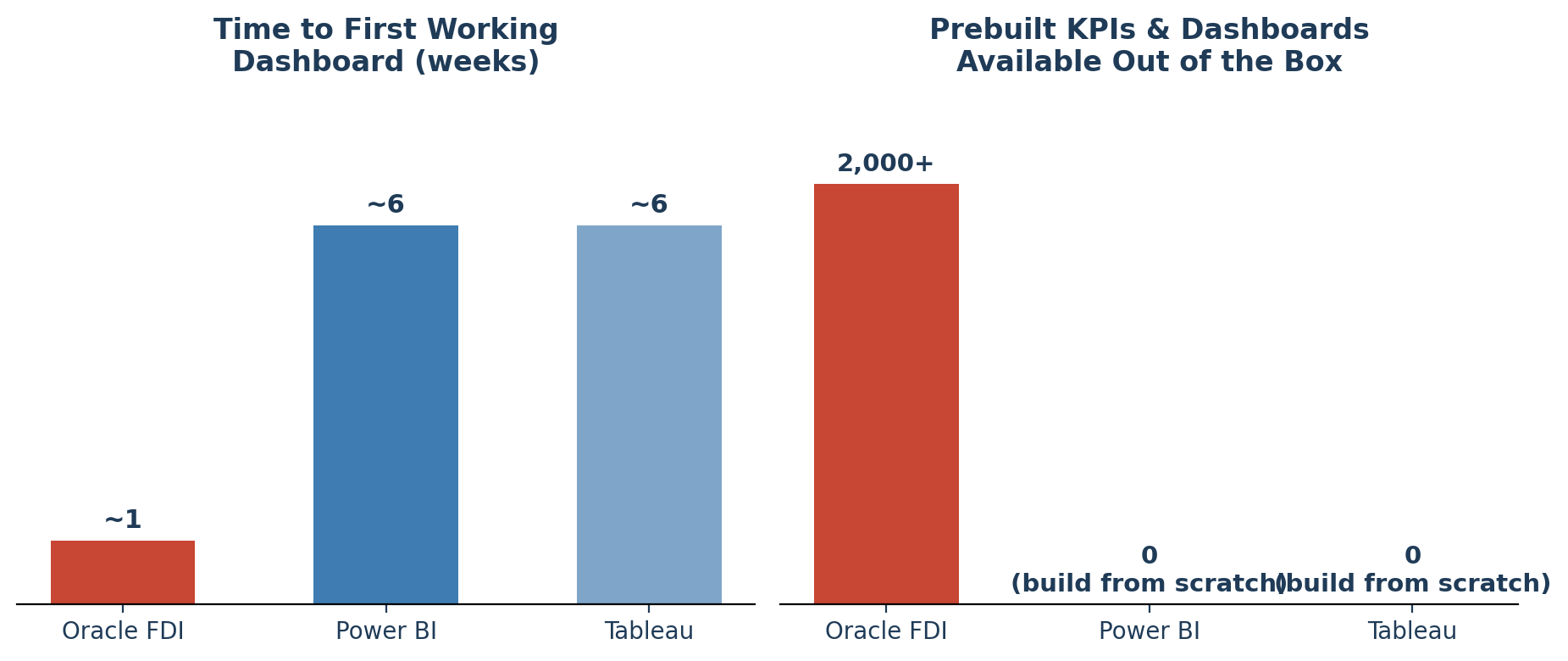
- 2,000+ prebuilt KPIs, dashboards & reports
- Fusion security & audit trail inherited automatically
- Embedded AI tuned to Fusion business processes
- Best for: Organizations running Oracle Fusion Cloud
- Time to first dashboard: Days
Power BI
- General-purpose BI with broad connector library
- Model built by hand (star schema, DAX)
- Row-level security configured & maintained manually
- Copilot AI — capable, but not Fusion process-aware
- Best for: Mixed, non-Oracle data landscapes
- Time to first dashboard: Weeks to months
Tableau
- General-purpose BI, strong exploratory visuals
- Model built by hand or via connector
- Row-level security configured & maintained manually
- Tableau AI (Pulse) — capable, but not Fusion process-aware
- Best for: Teams prioritizing visual, exploratory analytics
- Time to first dashboard: Weeks to months
| Capability | Oracle FDI | Power BI | Tableau |
|---|---|---|---|
| Built for | Oracle Fusion Cloud specifically | Any data source | Any data source |
| Data model | Prebuilt Conformed dimensions & fiscal calendars | Manual Star schema, DAX | Manual Built or via connector |
| Time to first dashboard | Days 2,000+ prebuilt KPIs | Weeks–months Model & connect from scratch | Weeks–months Model & connect from scratch |
| Security model | Automatic Inherits Fusion security | Manual Row-level setup required | Manual Row-level setup required |
| AI / ML | Process-aware Tied to Fusion processes | Generic Copilot, not process-aware | Generic Pulse, not process-aware |
| Best fit | Organizations running Oracle Fusion Cloud | Mixed data landscapes, broad connectivity | Exploratory, visual analytics teams |
3. Where Oracle FDI Pulls Ahead
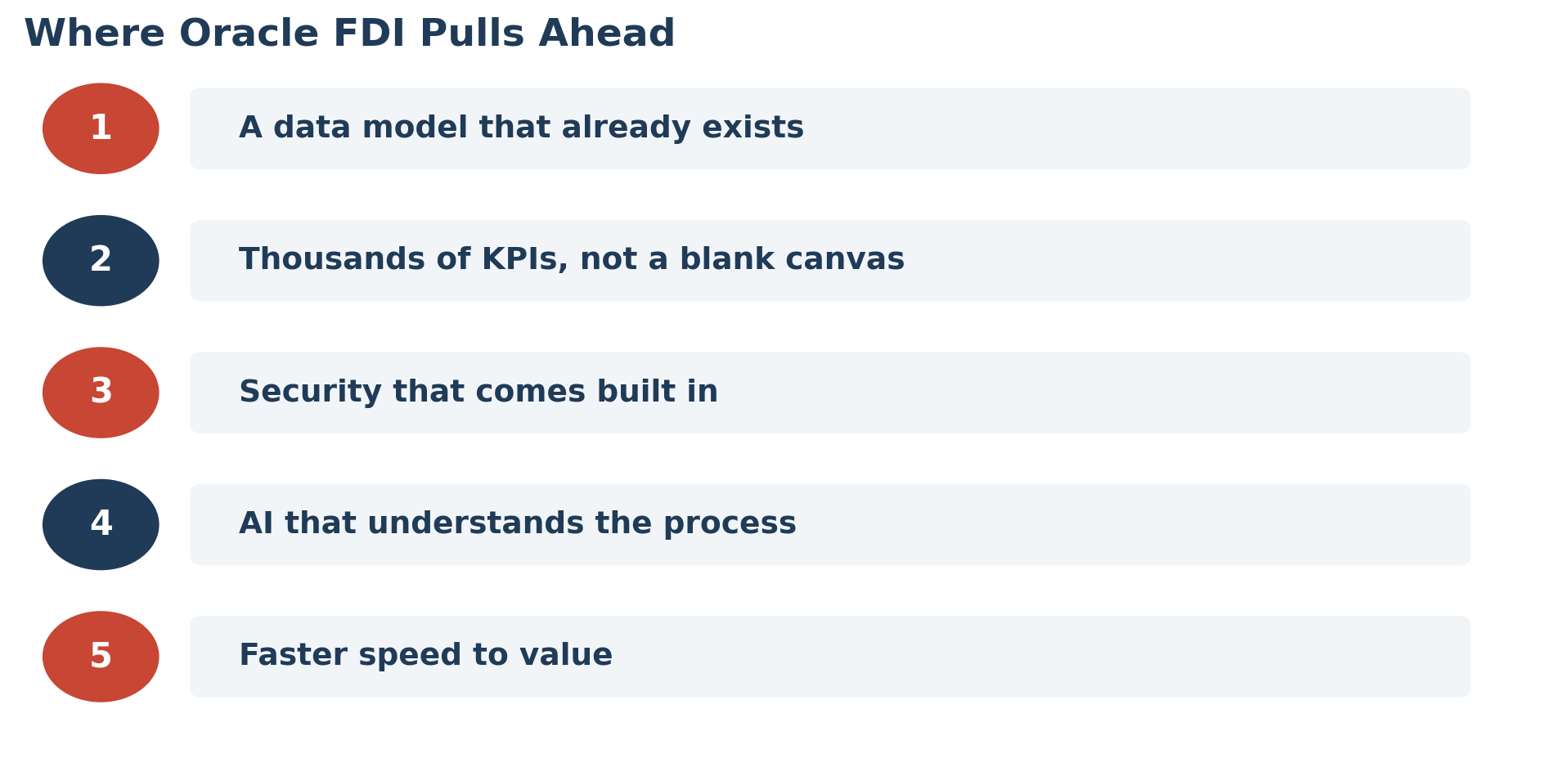
Five differences show up consistently once you actually build a dashboard against Fusion data with each platform.
A Data Model That Already Exists
FDI's semantic model already has conformed dimensions, fiscal calendars, and subject areas mapped to Fusion's data structures. In Power BI or Tableau, someone has to map chart of accounts segments and sales order hierarchies by hand — or stand up a separate connector or data warehouse first.
Thousands of KPIs, Not a Blank Canvas
FDI ships with 2,000+ prebuilt KPIs, dashboards, and reports across ERP, SCM, HCM, and CX. Power BI and Tableau start with an empty canvas — every KPI has to be defined, and two analysts can easily define "Average Order Value" two different ways without a governed definition underneath.
Security That Comes Built In
FDI automatically inherits Fusion's role-based and data-level security, with audit and lineage tracking native to the platform. In Power BI and Tableau, row-level security has to be configured manually and kept in sync every time a role changes in Fusion — an ongoing maintenance burden, not a one-time setup task.
AI That Understands the Process, Not Just the Data
FDI's embedded AI is trained around Fusion business processes — flagging procurement anomalies, forecasting demand, surfacing next-best actions. Power BI Copilot and Tableau AI (Pulse) are capable, but they analyze whatever data they're given without inherent knowledge of what a Fusion transaction represents.
Speed to Value
A Power BI or Tableau project against Fusion data typically starts with weeks of modeling and connector work before the first real dashboard appears. FDI's managed pipeline extracts, transforms, and loads Fusion data into a prebuilt model automatically — days to working dashboards, not months.
4. Cost, Maintenance & When Power BI/Tableau Still Win
The comparison doesn't stop at initial build time. Because Power BI and Tableau require a custom-built model, someone has to own that model going forward — updating it when Fusion releases quarterly updates, patching broken relationships, and re-validating KPI logic when definitions shift. That ongoing maintenance is easy to underestimate during a sales pitch and expensive to discover a year into a project.
FDI's prebuilt content is maintained by Oracle as part of the platform itself, so Fusion updates and FDI's data model stay in step without a dedicated internal team babysitting the integration. That doesn't eliminate the need for governance — someone still decides which KPIs matter — but it removes the plumbing work that consumes most of a typical BI project's budget.
This isn't a case that FDI is universally better — it's better for a specific job. Organizations with data spread across many non-Oracle systems, or teams that need maximum flexibility in visual design and cross-platform blending, will still find Power BI and Tableau's openness valuable. If the goal is a single dashboard blending Salesforce, a marketing platform, and a homegrown database alongside Fusion data, a general-purpose tool is often the more practical choice — even if it means building the Fusion piece from scratch.
📋 The honest way to frame it: Power BI and Tableau are built to connect to anything; Oracle FDI is built to already understand one thing — Oracle Fusion — extremely well. Choosing between them is about matching the tool to how concentrated or scattered your data actually is.
5. Which Platform Is Right for Your Business?
The best analytics platform depends on where your data actually lives and how your team already works.
✅ Key takeaways: Oracle FDI is purpose-built for Fusion Cloud data, with 2,000+ prebuilt KPIs, automatic Fusion security, and process-aware AI — cutting time to first dashboard from months to days. Power BI and Tableau still hold a clear advantage for non-Oracle or mixed data environments.
Ready to Build Faster with Oracle FDI?
Nexlify's analytics specialists help Oracle Fusion Cloud customers stand up FDI dashboards, KPIs, and governed data models — tailored to your business, not built from scratch.
Talk to an Oracle FDI Expert →